
Drone Gimbal Design: Parts, Axes and How Gimbals Work
The gimbal is the reason drone video looks smooth. A drone tilts every time it moves, vibrates from its motors, and gets pushed around by wind. Without a gimbal, all of that would end up in the footage. With one, the camera stays level and steady while the aircraft moves around it.
This guide explains what a drone gimbal is, how its parts work together, how 1-, 2- and 3-axis designs compare, and what engineers consider when designing one. It also covers how gimbals differ from electronic stabilisation and how to fix common gimbal problems.
Quick answer: A drone gimbal is a motorised camera mount that keeps the camera steady and level. Its own IMU senses every tilt and vibration, and a controller drives small brushless motors on each axis (tilt, roll and pan) to push the camera back the opposite way. A 3-axis gimbal stabilises all three rotations and is standard on camera drones.
What is a gimbal on a drone?
A gimbal is a pivoting mount that lets an object rotate around one or more axes. On a drone, it holds the camera and actively counters the aircraft’s motion. When the drone pitches forward to fly, the gimbal tilts the camera back by the same angle so the shot stays level.
The gimbal also lets the pilot aim the camera. You can tilt it down for a top-down shot or, on some drones, rotate it 90 degrees for vertical video. The flight controller and the gimbal share data, so the gimbal knows what the drone is about to do and can respond smoothly.

How a drone gimbal stabilises the camera
A gimbal is a closed-loop control system, very similar to a drone’s own flight controller. It runs a fast loop:
- An IMU mounted on the camera measures the camera’s rotation and angle.
- The gimbal controller compares that angle with the target angle (level, or wherever the pilot is pointing it).
- A PID controller calculates the correction needed on each axis.
- Motor drivers send current to each brushless motor to apply that correction.
- Angle sensors on each motor confirm the joint positions, and the loop repeats.
The controller also has to tell deliberate moves from unwanted ones. A pilot’s slow pan should be followed smoothly, while high-frequency shake should be cancelled. Settings such as gimbal smoothness in DJI Fly change how quickly the gimbal follows commands.
The sensor side works just like the drone’s main IMU. Our guide to drone gyroscopes, IMUs and stabilisation explains sensor fusion and the PID loop in more detail.
Parts of a drone gimbal
Whether it is built into a 250-gram Mini or a separate payload on an enterprise drone, every stabilised gimbal has the same core parts.
| Gimbal part | What it does |
|---|---|
| Brushless gimbal motors | One per axis; rotate the camera to counter movement |
| Gimbal IMU | Gyro and accelerometer on the camera that sense its angle and rotation |
| Angle sensors (encoders) | Report each motor’s exact position to the controller |
| Gimbal control unit (GCU) | Runs the control loop, drives the motors, talks to the flight controller |
| Arms and brackets | Rigid links that hold the motors and camera in line with the axes |
| Vibration dampers | Rubber balls or mounts that isolate the gimbal from the airframe |
| Camera mount or payload interface | Holds the camera; on enterprise drones, a quick-release connector |
| Flex cables or slip ring | Carry power, video and data through the moving joints |
Brushless gimbal motors
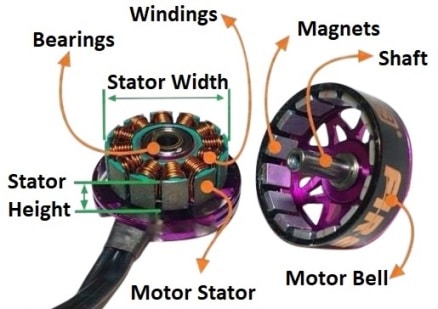
Gimbal motors look like small versions of a drone’s propeller motors, but they are built for a different job. A propeller motor spins fast continuously. A gimbal motor barely spins; it holds a precise angle and makes fast, tiny corrections. Gimbal motors are wound with many turns of fine wire and have many magnetic poles, which gives smooth torque at very low speed.
Modern gimbals drive these motors with field-oriented control (FOC), using encoder feedback to place the magnetic field precisely. This avoids the cogging, or notchy feel, that would show up as micro-jitter in video. For how propulsion motors differ, see our guide to drone motors and ESCs.
Dampers
Motors can correct slow and medium-speed movement but not the high-frequency buzz from propellers. Rubber dampers between the drone and gimbal absorb that buzz. If they harden, tear or fall out, you get “jello”, a wobbly distortion caused by vibration interacting with the camera’s rolling shutter.

1-axis vs 2-axis vs 3-axis gimbals
The number of axes is the number of rotations the gimbal stabilises with motors. Anything not stabilised mechanically must be handled by electronic image stabilisation (EIS), which crops the frame.
| Gimbal type | Axes stabilised | Strengths | Example drones |
|---|---|---|---|
| 1-axis | Tilt (pitch) | Light and cheap; relies on EIS for roll and yaw | Original DJI Neo |
| 2-axis | Tilt and roll | Level horizon; yaw shake handled by EIS | DJI Neo 2 |
| 3-axis | Tilt, roll and pan (yaw) | Smoothest footage; standard on camera drones | DJI Mini 4K, Mini 5 Pro, Air 3S |
| 3-axis, extended rotation | Tilt, roll and pan, with wide travel | Vertical shots, upward angles, rolling shots | DJI Mini 5 Pro, Mavic 4 Pro |
Gimbal travel has grown a lot. The DJI Mini 5 Pro’s gimbal can be controlled from -90 to 55 degrees in tilt and -180 to 45 degrees in roll, which allows true vertical shooting and upside-down rolling shots. The Mavic 4 Pro’s “Infinity Gimbal” rotates a full 360 degrees and can tilt up to 70 degrees for shots looking up.
Note for US buyers: new DJI models launched after the FCC added DJI to its Covered List in December 2025 cannot get FCC authorisation, so they are not officially sold in the US. Models that already had FCC authorisation can still be sold and flown, so check US availability before you choose a drone for its gimbal.
Gimbal design: what engineers balance
Designing a gimbal is a series of trade-offs between weight, stiffness, motor power and range of movement. The main considerations are:
- Balance: the camera’s centre of mass should sit where the three axes meet. A balanced camera needs almost no holding torque, so smaller motors can be used and battery draw stays low.
- Axis order: most drone gimbals put the pan motor nearest the drone, then roll, then tilt next to the camera.
- Stiffness: brackets must not flex, or the control loop starts to oscillate. Many designs use magnesium alloy, aluminium or carbon fibre.
- Mechanical stops and range: limits stop the camera hitting the airframe or seeing propellers. Continuous rotation needs a slip ring instead of flexible cables.
- Weight: every gram on the gimbal costs flight time, which is critical on sub-250-gram drones.
- Thermal and sealing: enterprise payloads need weather sealing and must work from cold mornings to hot rooftops.
Integrated cameras vs interchangeable payloads
Consumer drones integrate the gimbal and camera as one tuned unit. Enterprise drones such as the DJI Matrice 400 use quick-release payload ports. The camera and its gimbal come as one sealed payload, for example the Zenmuse H30T (zoom, wide and thermal cameras with a laser rangefinder) or the Zenmuse L2 lidar. Each payload has its own gimbal tuned for its weight. To compare these sensors, see our guide to thermal imaging cameras for drones.

Mechanical gimbal vs electronic stabilisation
EIS uses the camera’s gyro data to shift and crop each frame so the image appears steady. It adds no weight, which is why FPV drones, action cameras and 360 cameras rely on it. Tools such as Gyroflow apply the same idea after the flight using logged gyro data.
- Mechanical gimbal: no crop, full sensor resolution, and steady footage even in low light.
- EIS: lighter and cheaper, crops the image, can show blur smears in low light when the frame is shifted.
- Hybrid: many small drones combine a 1- or 2-axis gimbal with EIS for the remaining axes.
For the smoothest results from a mechanical gimbal, pair it with the right shutter speed and ND filter. Our drone video tips cover settings and camera moves that make the most of a stabilised camera.
Common gimbal problems and fixes
- Tilted horizon: run gimbal auto-calibration in the app on a level surface, then use horizontal adjustment for fine trim.
- Jello or micro-shake: check props for damage and inspect the rubber dampers.
- “Gimbal overload” or motor error: remove the gimbal cover and anything touching the camera, and check for grit in the joints.
- Drift in yaw: calibrate the drone’s IMU and compass, then the gimbal.
- Gimbal not moving after a crash: a flex cable may be damaged; this usually needs a repair centre.
Always remove the gimbal protector before powering on. Starting with it fitted can strain the motors. For how the gimbal fits with the rest of the aircraft, read our overview of the parts of a drone, and for current camera drone picks, see our guide to the best drones for aerial photography.
FAQs
What does a gimbal do on a drone?
It holds the camera steady and level while the drone tilts, turns and vibrates, and lets the pilot aim the camera. It does this with its own motion sensors and small motors that counter every movement in real time.
Is a 3-axis gimbal better than a 2-axis gimbal?
Yes, for video quality. A 3-axis gimbal also stabilises yaw (pan), so side-to-side twitches in wind do not reach the footage. A 2-axis gimbal relies on EIS for yaw, which crops the image. A 2-axis design is lighter and cheaper, which suits small drones.
Can I fly a drone with a broken gimbal?
The drone will often fly, but many models show warnings or limit features, and the footage will be shaky or tilted. A gimbal that hangs loose can also get caught on landing. Get it repaired before relying on it for any shoot.
How do I calibrate a drone gimbal?
In DJI Fly, open the camera or gimbal settings and choose gimbal calibration. Place the drone on a level surface and keep it still until it finishes. Use the horizontal adjustment option afterwards for any small remaining tilt.